Just subscribed to say I’m having the same dimming/color problem on some EU Version yeelink.light.color.4
Meanwhile, I’m still using a few light.color.2 which I got back in 2018 which still work fine. All updated to the last firmware.
also, with people reporting that non-updated bulbs work fine, why not just roll back the firmware???
Have this issues when using Recommended scene candle mode not working properly i have to turn off switch and turn on again to fix it, it was purely the firmware issues for this case, also if i changed brightness it can be fix aswell, this happen if i leave the light on for more than 12 hours and turn off using apps
Server : Singapore
Firmware : 2.1.7_0036
Hi all. Want to also share that this solution seems to be a good workaround.
I am using the Xiaomi Home app on Android to automate 2x on/off schedules for my bulbs, which essentially just flash the lights and reverts to the state they were originally in (see screenshot below). I have tested this for 72 hours now and so far no issues.
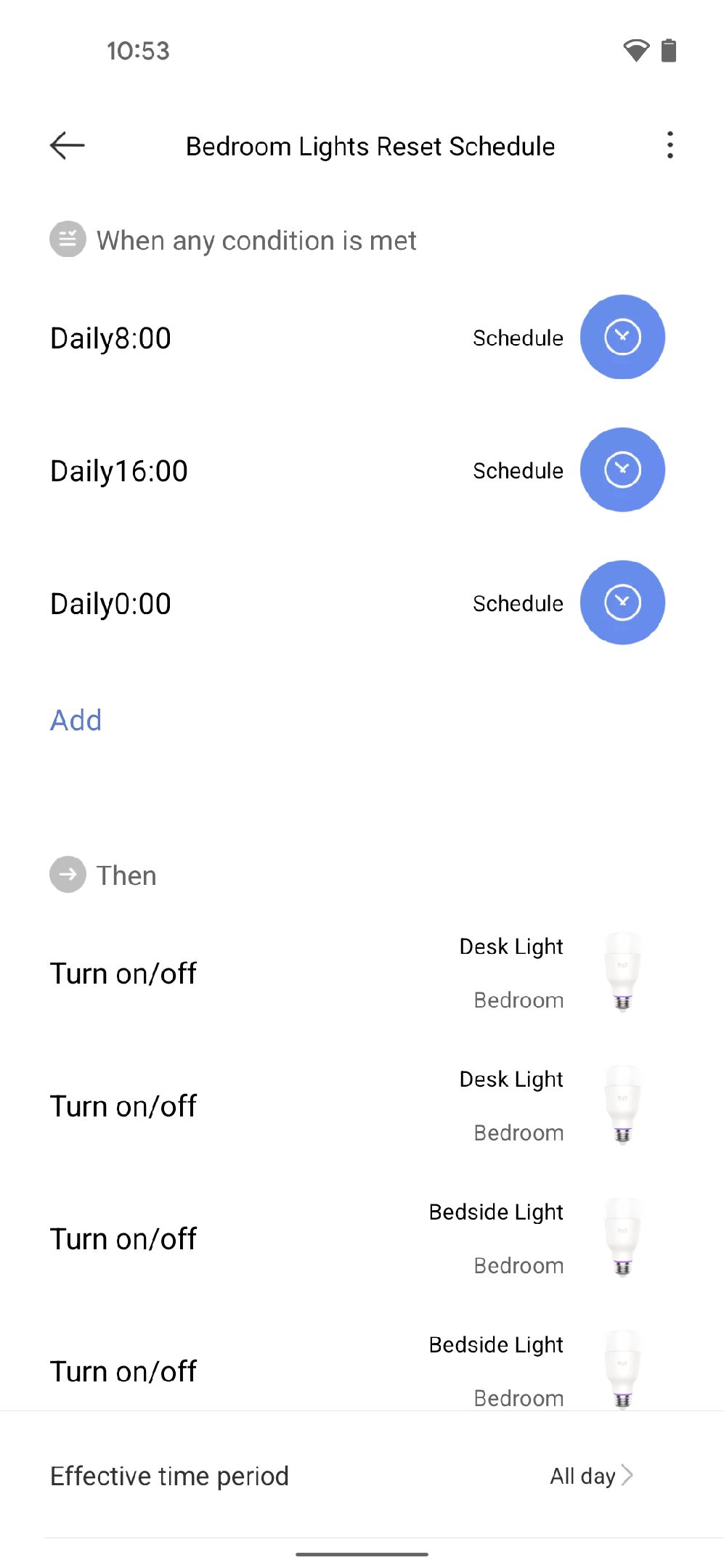
So basically to sum it all up, if the bulb is glitched out we can fix it by turning it on and off via physical switch, but the glitch can be prevented by never letting the bulb stay off for more than 8 hours.
Right? correct me if I’m wrong lads
Yeah mate, that seems to be case. Fingers crossed the workaround stays true, so long as Yeelight doesn’t solve the firmware issues.
welp I tried the on/off flash method and it didn’t work for me. Best I can do is temporarily fix it by turning it off and on using the physical light switch.
As a side note, I got these bulbs as a 3-pack. I updated the firmware on 2 of them, out of which one is glitchy and the other seems fine. I plan not to update the third one which is working correctly at the moment.
To me it looks like it’s a hardware problem that only appears if the firmware is updated.
Because it’s not possible to downgrade the firmware. Yeelight has decided that users are only allowed to install the most up to date version of firmware.
No one from yeelight gonna tell us what happen to this issues? Cmon…
2/3 of my bulbs do this. If I reset and don’t turn on night mode, then I don’t get the issue. Stupid work around, but I just have to be sure not to dim the light on certain colors. Hope they fix this.
Just saw this on twitter:
https://twitter.com/Yeelight/status/1414490920049909762
It seems as an hardware failure and with no firmware fix… And although I’ve reported this MONTHS ago, now a year has passed, will Yeelight get the lamps fixed or replaced?
We came here for help and the representatives of Yeelight are choosing to ignore us.
There is new firmware update anyone get this issues solve?
i got the new firmware. does not the solve the issue.
it’s a hardware problem, we need to give up on a fix via firmware.
I just got replacement already have this issues without being update to latest firmware… Build quality issues or something? Really hate to replace this bulb over and over
I had a similar issue with one of my LED 1S bulbs. Custom color doesn’t get saved. Tried MiHome app and Yeelight app. No joy. Now suddenly the bulb is no longer connected to my wifi network. Tried resetting the bulp several times, deleting the Yeelight app and reinstalling - still no go. Frustrating. It has been a few months. No sure if I can get it exchanged.
Bump. To solve the issue I have to turn on the lights using Homekit, then turn them off using Homekit, then turn them off using the light switch, and then turn them back on with the light switch. I have to do this everyday. This is a terrible product. I’ll try the workaround of having the light turn on during the day or at least every 8 hours.
So I have 3 of these bulbs. Two of them I never updated and they work correctly (still a bit weird compared to good bulbs - but they don’t go too wrong) and the one I updated screws up the colors when the brightness is around 50% and the only way to fix it is to turn it off and on from the physical switch, basically removing the electrical current from it.
So. If the firmware update is what glitches them, I really don’t understand - why can’t we just be allowed to roll back the firmware, since it would pretty much fix the problem???
The best way to correct is that. Reset the lamp by switching on and off 6 times until random colours appear. After that link your bulb with yeelight app instead of xiaomi home app. Boom your problem will be solved. Like if this provess works for you
After of more than a year dealing with this issue, I can assure you that does not do it. Even when I lent my lamps to friends and they reset it them, they get the same issue.
That Yeelight continues to ignore this problem is only one of the reasons why I will actively discourage people from buying your products. So many problems with your devices and worse than that, your customer service is basically non-existent.